Learning Studio / review
Review a course together
Invite feedback while preserving the author’s edit permissions.
Invite a reviewer
Section titled “Invite a reviewer”The author opens Share, enters the reviewer’s email, and uses Invite. The reviewer signs in with the matching account and opens the course from Shared for review. Do not assume invitation sends an email: confirm access with the reviewer through your normal channel.
Reviewers can read the shared course and leave feedback. Review access is not edit permission, ownership, or public learner publication.
Comment on content
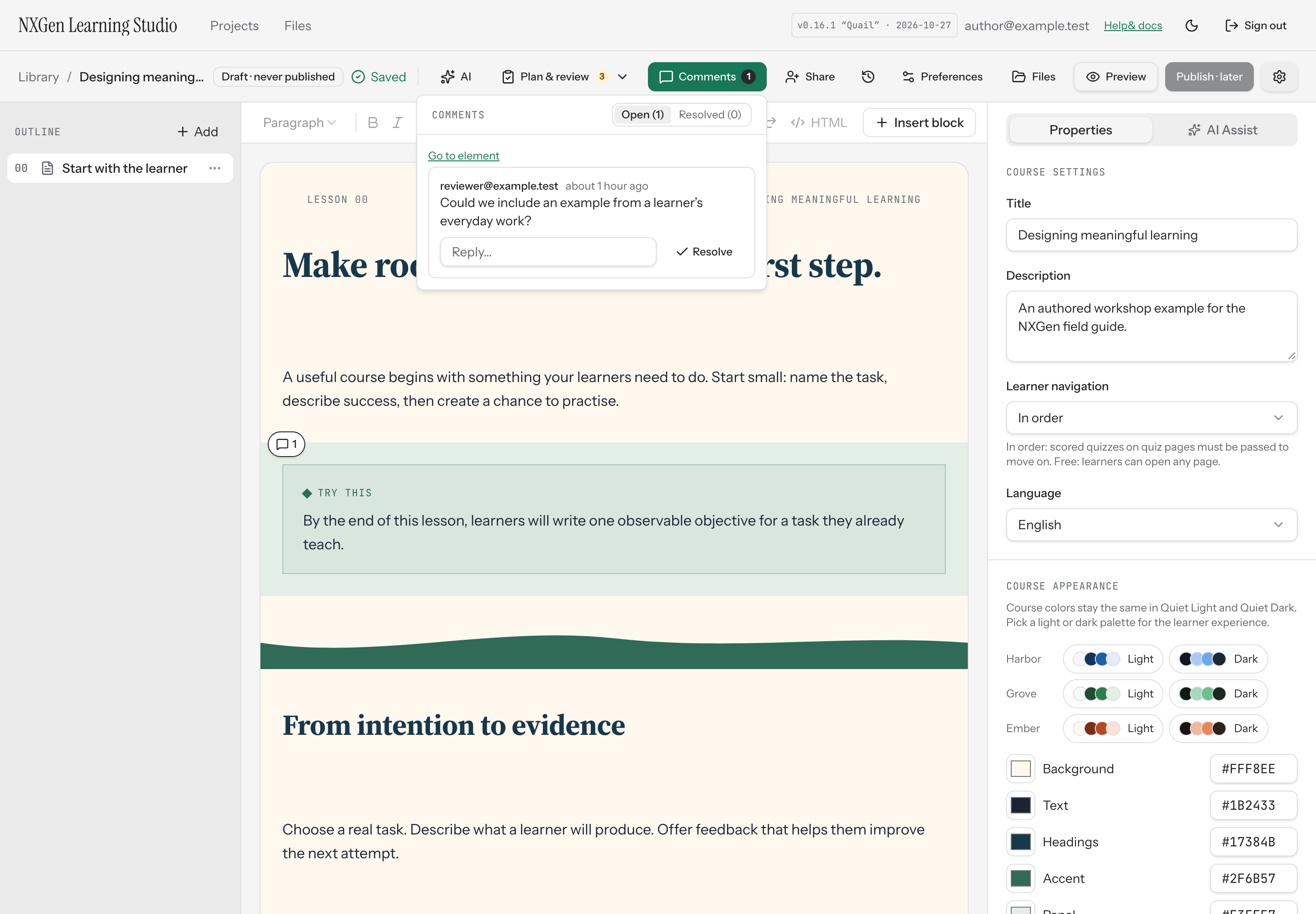
Section titled “Comment on content”Use comment pins or the Comments panel to create a thread associated with an element. Add a reply to continue the discussion, and resolve a thread when addressed. Reopen it if more work remains. Mentions provide context within comments; do not assume an external notification was delivered.
Authors can jump from a comment to the referenced element. If an element has been removed, the original comment context may no longer be navigable.
Visibility
Section titled “Visibility”Comment pins are an editor preference. Hiding pins does not delete feedback or change course content.